Your busiest SQL user has amnesia

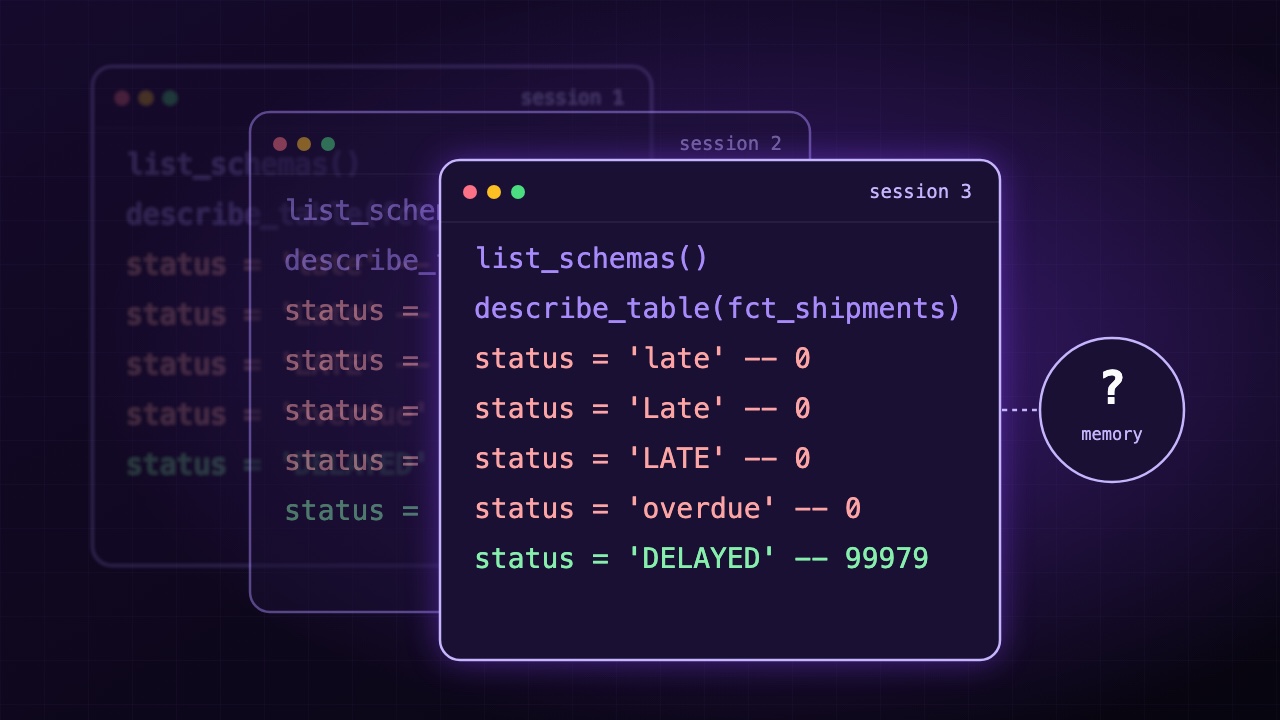
Someone types a question into a chat window:
How many shipments were late since July?
It takes five seconds to ask. Behind it, an agent that has never seen your warehouse has to find the right table, work out what "late" looks like in the data and write some SQL. Tomorrow, when someone asks again, it may start from nothing.
That makes it an unusual kind of SQL user. It forgets everything, it guesses instead of asking, and it does whatever your error messages tell it to. Almost nothing in the data stack was designed with this user in mind. Query logs assume a person will notice when something looks off. Error messages assume a person will go and read the docs.
A person reads an error and opens the docs. An agent reads an error and acts on it. For this user, your query path is part of the prompt.
We followed that question through QueryFlux, call by call. It took 13 tool calls and produced four confident wrong answers. It also showed that one of our own guardrails gets in the agent's way, and it caught several of our bugs.
How we ran it
We put 5 million rows in a DuckDB table called fct_shipments, then connected over MCP to a QueryFlux group with Postgres history, the result cache on, and the read_only, row_limit and require_predicate guards from our agent setup post.
We called the MCP tools from a script, not a model. The tools, guardrails and history were all real, but we wrote the sequence of calls ourselves to act out how an agent might work through this question. So this shows how the proxy responds to that behaviour. It doesn't measure how often real agents behave this way, and a capable model might find a shorter path.
We also chose the data to make the question hard. Only 5% of rows are DELAYED, and none of the first thousand are.
We ran the same 13 calls in three separate sessions:
| Step | Call | What came back |
|---|---|---|
| 1 | list_schemas | The schema list |
| 2 | describe_table, with 2 sample rows | Column types. The sample was denied |
| 3 | SELECT * with no filter | Denied: no WHERE |
| 4 | Filtered, LIMIT 100000 | Denied: over the 5,000 row limit |
| 5 | Filtered, LIMIT 50 | 50 rows, all DELIVERED |
| 6 | SELECT DISTINCT status | Denied: no WHERE |
| 7–10 | count(*) for 'late', 'Late', 'LATE', 'overdue' | 0, four times |
| 11 | The same for 'DELAYED' | 99979 |
| 12 | Late shipments by carrier | The final answer |
| 13 | A DELETE, as a probe | Denied: read only |
All the messages and rows below are real output from these runs.
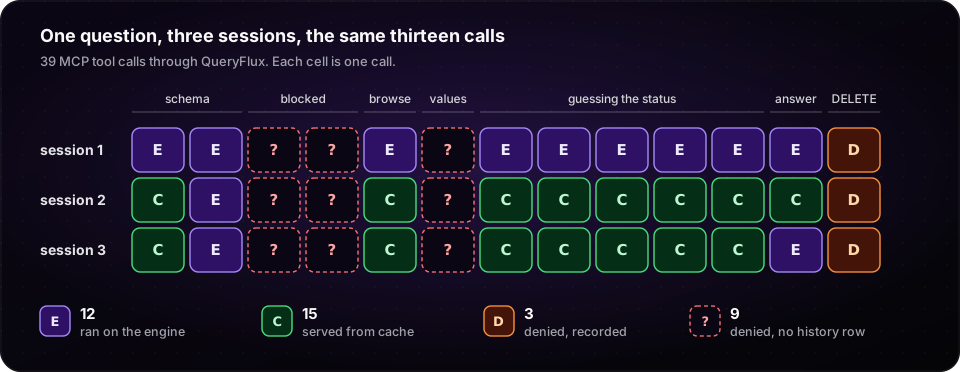
describe_table. The dashed cells are a bug we found along the way, covered near the end of this post."What's in here?"
The agent starts by looking around. list_schemas works, and describe_table returns the column types. describe_table can also return sample rows, which is the fastest way to learn what a column holds. Here's what the agent got instead:
"sample": {
  "error": "query must include a WHERE predicate"
}
The tool's own SELECT * FROM "fct_shipments" LIMIT 2 hit require_predicate, the guard we'd set up to protect the table. The call still reports success, with column types and no values. A guard that blocks full scans also blocks a two-row peek, so the agent knows status is a VARCHAR and nothing more.
"Can I see some rows?"
The agent tries to look at the data directly, and the guardrails push back. Here's everything it received, in full:
query must include a WHERE predicate
LIMIT 100000 exceeds maximum allowed 5000
Its third attempt, with a filter and LIMIT 50, gets through. Every row says DELIVERED, because late shipments are rare. So the agent asks the obvious question, SELECT DISTINCT status FROM fct_shipments, and gets the same denial again.
Each piece is doing its job here, and together they make it harder to learn what the data looks like. Guardrails don't only stop bad queries. They also decide what an agent is able to find out.
Those messages were written for people, and they're fine for people. To a model they're the next instruction, and "must include a WHERE predicate" is a weak one. It doesn't mention that adding a filter would make the DISTINCT query work, which it does: we tried it and got all three values. A capable model may get there alone, but nothing in the message points the way. The message also doesn't say what makes a good filter, and a guard can't write the right WHERE for it. This passed every guard:
SELECT * FROM fct_shipments WHERE 1=1
With max_rows set to 5, the agent got 5 rows and "truncated": true, while the history row says 5,000,000. max_rows limits what the agent receives, not what the engine produces.
Writing the message for the model
A guard's reason goes back to the agent as written, so you can make it useful. We ran a small Python guard that denies the same query with this reason, and it came back over MCP word for word:
fct_shipments has about 5M rows, so it needs a filter. Filter on ship_date, for
example WHERE ship_date >= DATE '2026-07-01'. status only holds DELIVERED, DELAYED
and RETURNED.
guardrails:
  groups:
    agents:
      - kind: python_script
        script: |
          def check(ctx):
              sql = ctx["sql"].lower()
              if "fct_shipments" in sql and "where" not in sql:
                  return {
                      "action": "deny",
                      "code": "MISSING_PREDICATE",
                      "reason": "fct_shipments has about 5M rows, ...",
                  }
              return {"action": "allow"}
The substring check keeps the example short, so don't copy it as your real rule. What matters is that one denial now names the column to filter on and the values status holds, which is what the next five calls would otherwise spend their time on. Our script can't tell you how much a real model gains from this, but it's a cheap thing to measure on your own traffic.
QueryFlux already prompts the model in one place: its MCP responses include a _hint field telling it to pass conversation_id on its next call. Once you see these messages as prompts, a few rules follow:
- Say what to do next. Name the column, the allowed values or the limit.
- Treat the text as model input. Don't paste untrusted values into it, and don't put anything in it that the caller shouldn't see.
- Write for both readers. The same guard answers people on SQL drivers too, and they get the same text.
- Deny if the model has to know. A
warnis recorded in history but never reached the agent in our runs.
Infrastructure failures count as well. We stopped our webhook guard and sent one query. QueryFlux failed closed, as configured, and the agent received this:
http webhook guard failed after 1 attempt(s): error sending request for url (http://127.0.0.1:18999/guard)
So the model got an internal URL and nothing about what to do next.
"What does late look like?"
Now the agent guesses. Here's what came back, and this is the part of the session we'd worry about most:
| Query | Status | Result |
|---|---|---|
WHERE status = 'late' | Success | 0 |
WHERE status = 'Late' | Success | 0 |
WHERE status = 'LATE' | Success | 0 |
WHERE status = 'overdue' | Success | 0 |
WHERE status = 'DELAYED' | Success | 99979 |
Zero late shipments is a perfectly believable answer. The query was valid, it ran, and it returned a clean number. Our script kept going because we told it to. A real agent could stop at the first 0 and tell someone their logistics are flawless.
By any ordinary dashboard, this session looks fine. All five queries succeeded and returned one row each, so an error-rate panel won't show this.
Query history can, because every record carries a fast_hash. It replaces literal values with a placeholder, skips comments, lowercases everything and collapses runs of whitespace. Those five queries all share one, so you can look for one shape retried with different literals in one session:
SELECT conversation_id,
       count(*) AS attempts,
       count(DISTINCT sql_preview) AS variants,
       min(sql_preview) AS example
FROM query_records
WHERE conversation_id IS NOT NULL
  AND fast_hash IS NOT NULL
  AND NOT was_guard_blocked
GROUP BY conversation_id, fast_hash
HAVING count(DISTINCT sql_preview) >= 3
ORDER BY attempts DESC;
 conversation_id | attempts | variants | example
-----------------+----------+----------+-----------------------------------------------------------------------------------
 conv-1          |        5 |        5 | SELECT count(*) AS late FROM fct_shipments WHERE status = 'DELAYED' AND ship_date >= ...
 conv-2          |        5 |        5 | SELECT count(*) AS late FROM fct_shipments WHERE status = 'DELAYED' AND ship_date >= ...
 conv-3          |        5 |        5 | SELECT count(*) AS late FROM fct_shipments WHERE status = 'DELAYED' AND ship_date >= ...
Read this report with some care. An agent deliberately comparing carriers also produces many variants, so a hit is a reason to look, not a verdict. sql_preview holds the first 500 characters, so queries that differ only after that count as one variant. Non-MCP clients only appear if they identify themselves: X-Agent-Id and X-Conversation-Id headers over HTTP, or agent_id and conversation_id session parameters on the PostgreSQL and MySQL wire protocols.
The hash is coarse in two ways. Double-quoted identifiers become a placeholder too, so "orders" and "users" hash the same. Spacing around operators still counts, so status='late' and status = 'late' don't. Look at the SQL before treating a group as one query shape.
Finding DELAYED doesn't settle the question either. Whether it's what the person meant by "late" is a matter of definition, and our Ossie posts cover that problem and our planned tools for looking up real values. This post is about the path to the SQL.
"How many shipments were late since July?" Again.
Now a second person asks, or the same person asks tomorrow. Unless you've given the agent memory, it starts from zero: the same schemas, the same denials, the same guesses.
QueryFlux has no agent memory, and nothing here fixes the forgetting. What it does have is a general result cache, which you turn on per cluster group and which treats agents like any other client. That saves the engine some repeated work: sessions 2 and 3 got most of their answers without touching it, because a cache hit is served before a cluster slot is taken. But the cache hits come from repeats we scripted, and the agent still makes every call, so none of its turns or tokens are saved.
Small differences also get past the cache. Session 3 sent the same final query as sessions 1 and 2, but lowercase and on several lines, and it went to the engine. The key uses the exact SQL text, which is the safe choice, and models don't produce SQL in one fixed format. DESCRIBE also missed in all three sessions.
Don't try to fix this by sharing the cache more widely. The key includes the authenticated user, and that's deliberate: once row filters are in play, two users can get different correct answers to identical SQL.
fast_hash sees what the cache can't, so you can look for shapes repeating across sessions:
SELECT fast_hash,
       count(DISTINCT conversation_id) AS sessions,
       count(*) AS runs,
       count(*) FILTER (WHERE cache_hit) AS cache_hits,
       count(DISTINCT sql_preview) AS texts
FROM query_records
WHERE conversation_id IS NOT NULL
  AND fast_hash IS NOT NULL
  AND NOT was_guard_blocked
GROUP BY fast_hash
HAVING count(DISTINCT conversation_id) > 1
ORDER BY runs DESC;
      fast_hash       | sessions | runs | cache_hits | texts
----------------------+----------+------+------------+-------
 -7984637337624251870 |        3 |   15 |         10 |     5
  5285813286249914199 |        3 |    3 |          2 |     1
  6079413669322569383 |        3 |    3 |          2 |     1
 -4954480381991223206 |        3 |    3 |          1 |     2
  7713878201271485879 |        3 |    3 |          0 |     1
The fourth row is the reformatted query: one shape, two texts, one hit. In production, the top rows of this report are a to-do list. They show you what your agents keep having to rediscover, and what to put in their context so they stop asking.
Why not put memory in the proxy?
If agents forget, and the proxy sees everything, the obvious next step is to have the proxy remember for them. Storing it would be the easy part. The hard part is deciding who may see it and whether to trust it:
- Memory can get around access control. A remembered literal or sampled value can be data the next user isn't allowed to see.
- Identity has to be verified.
agent_idandconversation_idcome from the client, so memory would have to be keyed on the authenticated user. With a shared service token, everyone counts as one user. - History doesn't know what worked. Those four zeros are all
Success, so "remember what succeeded" saves the wrong answers too. - Notes become prompts. A note written by one agent and read by another is a lasting prompt injection risk.
- Notes go stale. A confident note about a renamed column is worse than no note.
Per-agent memory is already a job for agent frameworks. What a proxy can offer is shared knowledge about the data, across every framework. If we were starting on this today, we'd use the reports above to find what agents keep getting wrong, have a person write the fact down, and return it where agents already look, such as in a guard's reason.
What if it never stops?
Our session ended at step 13 because the script did. A real agent decides for itself when to stop.
maxRunningQueries limits how many queries run at once, not how many run in total. An agent looping on one query at a time stays under any concurrency cap for as long as it likes. That calls for a limit per conversation, and an http_webhook guard can provide one, since it receives the verified user and the agent_context. The core of the handler we ran:
BUDGET = 4

def decide(ctx):
    agent = ctx.get("agent_context") or {}
    key = (ctx.get("user"), agent.get("conversation_id"))
    spent[key] += 1
    if spent[key] > BUDGET:
        return {
            "action": "deny",
            "code": "CONVERSATION_BUDGET",
            "reason": f"This conversation has used its budget of {BUDGET} queries. "
                      "Do not run more. Answer with what you have found "
                      "and say what you could not determine.",
        }
    return {"action": "allow"}
Four queries passed, and the next one got this back:
This conversation has used its budget of 4 queries. Do not run more. Answer with
what you have found and say what you could not determine.
The last sentence does the real work. A bare "limit exceeded" invites another attempt, or an answer that hides the gap. This tells the agent how to finish and asks it to be honest about what it doesn't know.
Three things to plan for if you run one of these:
- It's a way to steer a cooperative agent, not a security boundary.
conversation_idcomes from the client, so a caller can start a fresh budget just by changing it. Keep limits you need to enforce on things the agent can't choose, like identity, group allow-lists and capacity. - State has to be shared. Our counter lived in one process. With several webhook replicas, it belongs in a shared store.
- The webhook is now in the query path. Set
timeout_msand choosefail_behavioron purpose:denystops queries when the webhook is down, andallowdrops the budget.
What the session caught in our own proxy
Following one question also turned up places where QueryFlux doesn't do what we expected, or what our docs say. All of these are open as of this post.
| What we found | Evidence from the run | What to do for now |
|---|---|---|
| Denials can leave no audit record when the group has the cache on. A deny from the guard pass before the cache lookup isn't written to history. | 39 calls ran 42 statements and produced 30 history rows. Twelve of 15 denials are missing. With the cache off, the same denials are recorded. | Keep the cache off on that group. That isn't a guarantee: a client can still turn the cache on for one query, with the X-QueryFlux-Cache header, a query tag or a /* queryflux:cache */ comment, and that query's denial goes unrecorded. |
| Guards run twice on a cache miss, once before the lookup and once before execution. | With the cache on, our budget of 4 ran out after 2 queries. The webhook got 8 calls for 6 queries. | Run counting guards on groups with the cache off, with the same per-query caveat. |
require_predicate blocks the sample inside describe_table. | The tool reports success, with an error in place of the sample. | Give agents the values another way, such as in a guard's reason. |
query_intent isn't inferred. The heuristic exists but nothing calls it. | Every row in the run says unknown, including plain aggregations. | Have clients send query_intent themselves. |
The guard code doesn't reach an MCP agent. It's stored in guard_actions, but only reason goes back. | Every denial above arrived with no code. | Put anything the agent needs into reason. |
warn reasons don't reach an MCP agent. | Responses to warned queries contain no warning. | Use deny when the model needs to know. |
| Webhook failure text goes to the agent, including the URL. | The message shown above. | Don't put secrets in webhook URLs. |
The first one matters most. "Every denial is in the audit log" is exactly the sort of claim that's easy to believe and rarely tested, and it took some scripted calls and a row count to disprove it.
Follow a question through your own stack
If you already have agents going through QueryFlux with Postgres persistence, this takes about an hour:
- Pick one real question. Run it through
describe_tableas your agent, and check that your guards aren't hiding the values it needs. - Run the two reports above. Start with the top repeated shapes and the highest
variantscounts. - Read your denial messages as a model would. For each one, ask whether it says what to do next.
- Compare counts. Send a known number of calls, including some that should be denied, and count the history rows.
Design for the reader who believes you
Agents aren't bad users. They're literal ones, and that changes the job of the query path:
- Guardrails shape what agents can learn, so check what they hide as well as what they stop.
- Error messages are instructions, so write them as carefully as a system prompt.
- A query that succeeds can still be wrong, so watch for retries as well as errors.
- History is how you learn what agents are missing, so look at repeated shapes as well as failures.
- Concurrency limits don't end loops, so give each conversation a budget, and tell the agent how to finish when it runs out.
None of this needs a smarter model. A five-second question turns into a long conversation with your warehouse, and the proxy is the one place that hears all of it.
Start with the MCP quickstart, then add guardrails and agent context. The queries above run against query_records in any deployment using Postgres persistence.