Give agents SQL, not the keys to every engine

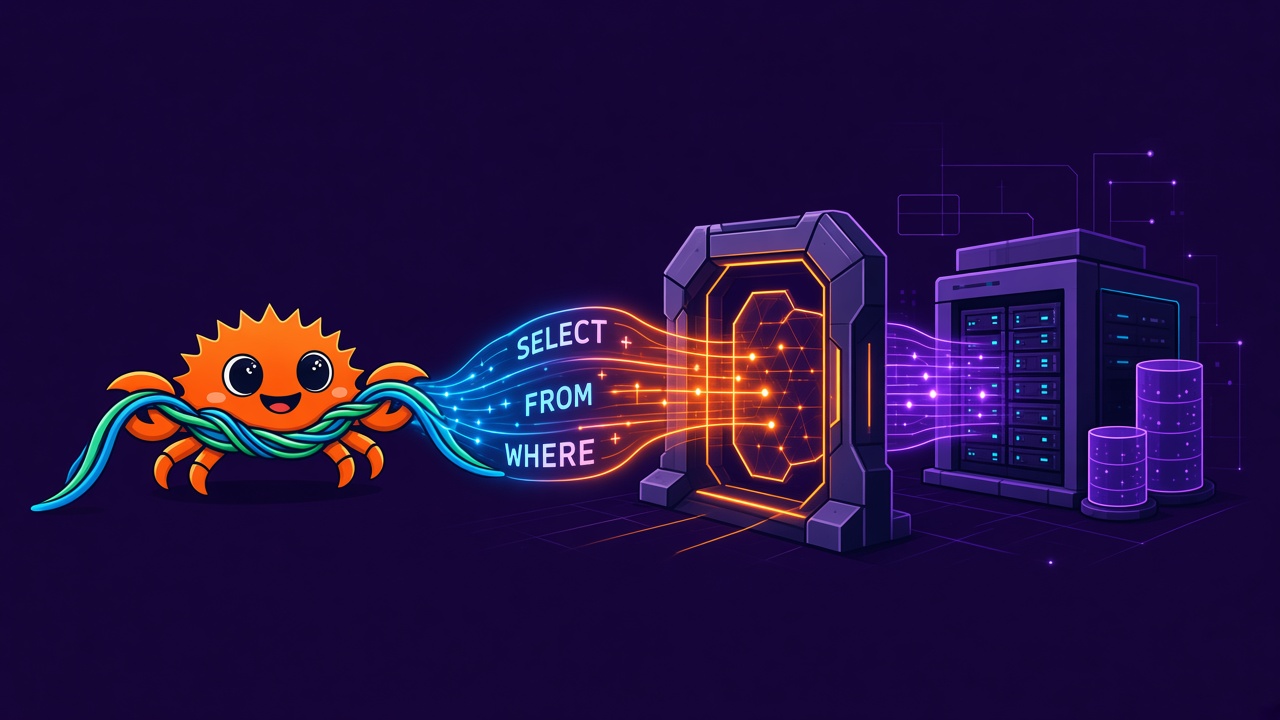
The fastest way to give an AI agent data is also the worst one: hand it a warehouse connection string and let it write SQL. It works in a demo. In production it means one shared credential for every agent, no record of which agent ran what, and nothing between a generated SELECT * and your largest table.
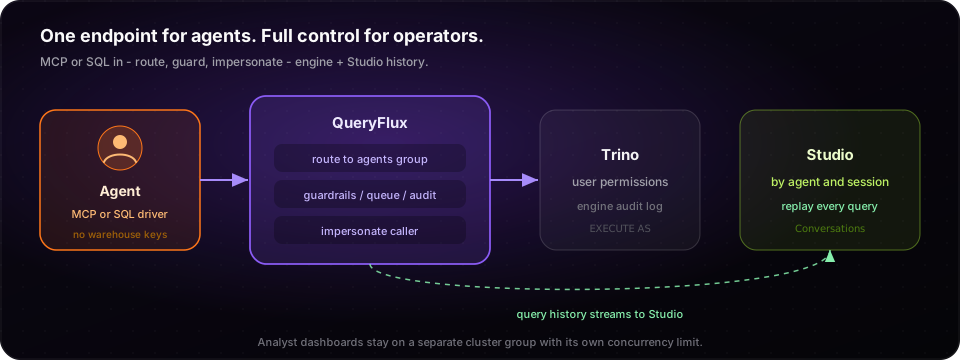
Agents shouldn't choose engines, and they shouldn't hold warehouse passwords. Something in the query path should decide where each query runs, what it may do, and keep the record.
This post shows how to set that up with QueryFlux using features that ship today.
The setup in one file
One QueryFlux config gives agents a verified identity, their own entry point, capacity pool, guardrails, and per-user identity on the engine:
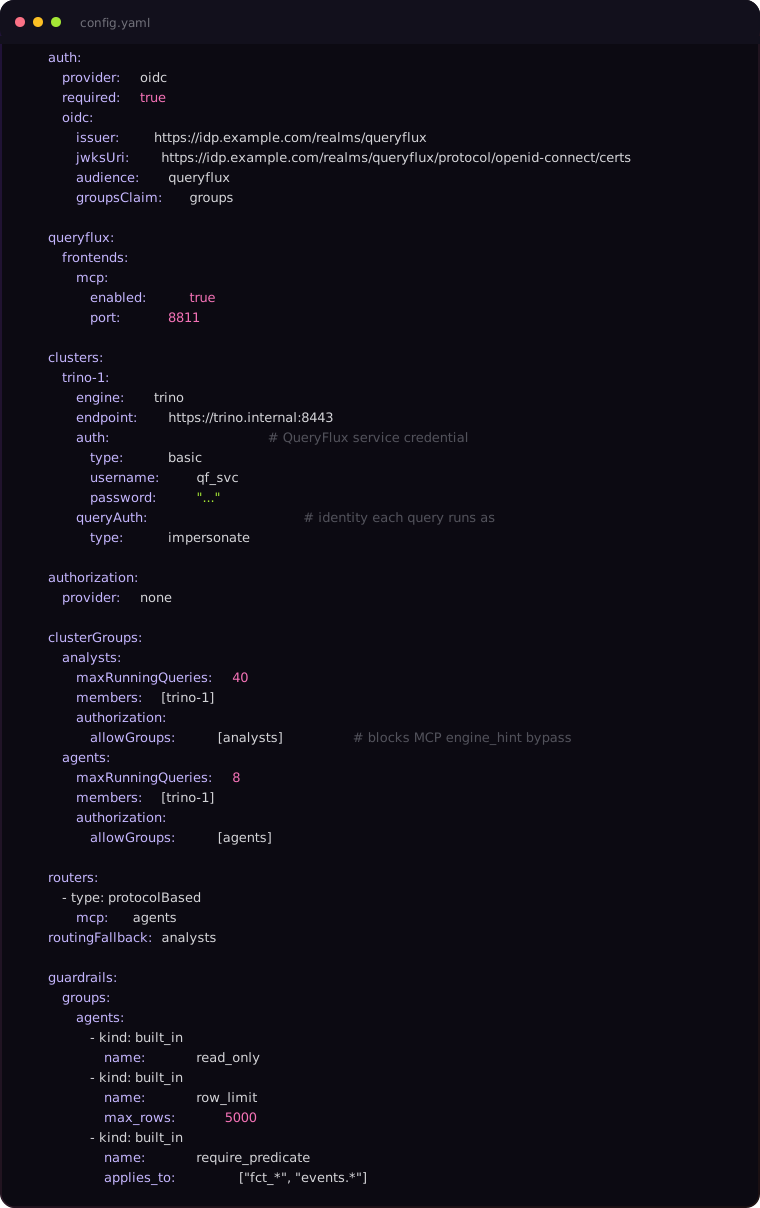
The sections below map directly to that file.
1. One endpoint, any agent
Turn on OIDC (or another verified provider) with auth.required: true so MCP callers cannot connect as anonymous. Agents send a bearer token on every request:

The agent gets tools to run a query, list schemas, describe a table, read the engine's plan, and check or cancel what it started.
Agents that prefer a SQL driver can connect over Trino, PostgreSQL, or MySQL instead — routing, guardrails, impersonation, and audit work the same because they live in the query path, not in the MCP layer.
2. Agents get their own lane
The protocolBased router sends every MCP query to the agents group, which has its own maxRunningQueries. A burst of exploratory agent queries queues in its own lane instead of starving dashboards in analysts.
MCP's execute_query also accepts an optional engine_hint that can name a cluster group and skip the router. Without a group allow-list, an authenticated agent could hint analysts and pick up that group's capacity without its agent guardrails. The config above sets authorization.allowGroups on each group so only IdP group analysts can reach analysts, and only agents can reach agents.
With Postgres persistence, the limit holds across every QueryFlux replica and worker, and waiting queries are served first come, first served.
3. Guardrails in the query path
The agents group gets three built-in guards on top of any global ones:
| Guard | Effect |
|---|---|
read_only | Blocks anything that isn't SELECT, WITH, SHOW, DESCRIBE, or EXPLAIN |
row_limit | Denies queries whose outer LIMIT exceeds 5,000 rows; warns when there is no LIMIT |
require_predicate | Rejects scans of fact/event tables with no WHERE |
A blocked query returns an error naming the rule that failed, so the agent can rewrite and retry. When the built-ins aren't enough, add a Python guard or call your own webhook — both receive the agent's context.
A rule in an MCP wrapper only holds while the agent uses that wrapper. A rule in the data path holds for MCP, SQL drivers, and anything else that speaks to the proxy.
4. The engine sees the person, not a shared account
With queryAuth: impersonate, QueryFlux authenticates to Trino with its own service account but runs each query as the verified user from the bearer token. The engine applies that person's permissions and writes that person into its audit log. There is no shared password for an agent to leak or overreach with — and without auth.required, impersonation would only forward anonymous.
Trino and ClickHouse support impersonation. For Snowflake and Trino, QueryFlux can instead exchange the caller's OAuth token for one the engine accepts, or pass the caller's credential through.
For finer control, add row filters and column masks from OPA or Cerbos — they apply to agents exactly as they apply to people.
5. Every query has an owner
QueryFlux stores agent context when it is present:
- MCP:
agent_iddefaults from the authenticated user andconversation_idfrom the MCP session.step_indexandtool_call_idare optional — the client must send them (as tool parameters orX-Step-Index/X-Tool-Call-Idheaders) if you want a full step-by-step trail. - Trino HTTP (and other SQL drivers): both
X-Agent-IdandX-Conversation-Idare required for the request to count as agentic; otherwise it is treated as a normal client query. Optional headers cover step, tool call, and intent.
In Studio, the Agents and Conversations pages group history by agent and session so you can replay what was recorded: every query, where it ran, how long it took, and which guardrail stopped it.
What this adds up to
An agent gets one endpoint and the SQL it needs. You keep control of:
- which engine runs each query;
- how much of the cluster agents can use;
- what agents may do;
- whose permissions apply on the engine;
- a record of agent and conversation — plus step/tool metadata when the client supplies it.
It works the same over MCP and over a SQL driver, on the engines you already run.
Start with the MCP quickstart, then read guardrails, agent context, and authentication.