Hub
A hub sits between the workers at one site (a data center, a VPC, a customer network) and a control plane that runs somewhere else, for example a hosted one. Workers connect to the hub exactly as they would to a control plane. The hub is the only process at the site that connects upstream, and it only ever opens connections; nothing connects into the site.
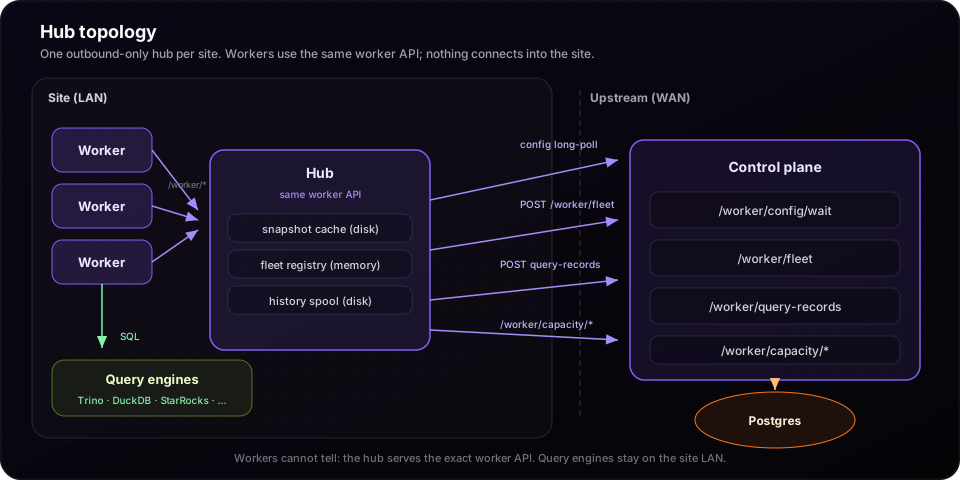
Read Worker mode first: the hub relays that protocol and changes nothing about how workers behave.
When to use it
| Setup | Use |
|---|---|
| Workers and control plane in one network | Workers connect to the control plane directly. No hub. |
| Workers in a network that may only make outbound connections, or far from the control plane | One hub per site. |
| Many workers at one site | One hub, so upstream sees one connection and one credential per site instead of one per worker. |
What the hub does
| At the site | Upstream | |
|---|---|---|
| Config | Workers long-poll the hub. Their waits wake as soon as a new revision reaches it. | The hub long-polls /worker/config/wait and serves the snapshot it gets, with upstream's revision. The one exception: when upstream names controlPlane.history.endpoint, the hub removes it and re-seals the snapshot, so workers get a new revision (Query history); /hub/status shows both revisions. The last snapshot is cached on disk. |
| Fleet | Workers register and heartbeat with the hub. | Every heartbeat interval the hub posts its live workers to /worker/fleet, where they appear as <site>/<worker> with parent: <site>. It also registers itself, with kind: hub. |
| Query history | Each batch a worker sends is redacted and written to disk before the worker gets its 202. | A flusher posts the oldest batch upstream and deletes it once accepted. Each record keeps its worker's name, as <site>/<worker>. |
| Capacity | Workers' acquires, releases, waits, quota reports and sweep locks go to the hub. | The hub forwards each one, so one maxRunningQueries holds across every site and the control plane. Each worker's lease and quota holder is sent as <site>/<instanceId>, so two sites with a worker-0 hold separate leases and quotas. |
The hub runs no query frontends and no engine adapters. It needs no database.
Configuration
Every key, its default and its rules: Configuration by role.
Hub
queryflux:
  role: hub
  workerSecret: <what this site's workers present>
  adminApi:
    port: 9000                       # the worker API and /readyz, /metrics, /hub/status
  hub:
    site: us-east-dc1                # the site you created on the control plane
    stateDir: /var/lib/queryflux/hub
    snapshotCache: true              # default
    historySpool:
      maxBytes: 1073741824           # default 1 GiB; the oldest batches are dropped beyond it
    upstream:                        # the same block as a worker's upstream
      url: https://cp.example.com:9000
      enrollToken: qfe_…             # one-time token from the control plane
      pollTimeoutSecs: 30
      heartbeatIntervalSecs: 10
hub.upstream.enrollTokenis a one-time token for this site (see Enrolling a hub). Instead,hub.upstream.secretcan hold the control plane'sworkerSecret; the control plane then trusts whatever site the hub reports.workerSecretis what the site's workers present. Use a different value from the upstream credential, so a worker never holds it.- A hub rejects everything it gets from upstream (
clusters,clusterGroups,routers,auth,guardrails,capacity, …), apersistenceblock, and theworkerandcontrolPlanesections.
Enrolling a hub
Each hub proves its site with a key of its own. The control plane stores only the public key, and the hub signs every request with a token that expires within 5 minutes, so nothing stored or sent can be replayed for long. Enrollment needs a control plane with Postgres.
-
Create the site, optionally limited to some clusters, and a one-time token for it (admin API, Basic auth):
curl -u admin:… -X PUT https://cp.example.com:9000/admin/sites/us-east-dc1 \-H 'content-type: application/json' -d '{"clusters": ["trino-dc1"]}'curl -u admin:… -X POST https://cp.example.com:9000/admin/sites/us-east-dc1/enrollment-tokens \-H 'content-type: application/json' -d '{"ttlSecs": 3600}'# {"token":"qfe_…","site":"us-east-dc1","expiresAt":"…"}The token is shown once; the control plane keeps its SHA-256. It works for one hub, for
ttlSecs(default 1 hour, at most 7 days). -
Put it in the hub's
hub.upstream.enrollTokenand start the hub. On first start the hub generates an Ed25519 key, presents the token and its public key toPOST /worker/enroll, and keeps the key instateDir/identity.json(owner-only). The token is then spent; later starts use the key. -
Check
GET /admin/sites: it lists each site with its clusters and enrolled hubs.
| Admin endpoint | What it does |
|---|---|
GET /admin/sites | Sites, their clusters and enrolled hubs |
PUT /admin/sites/{site} | Create a site, or set its clusters (omit or null: every cluster) |
DELETE /admin/sites/{site} | Delete a site; its hubs and unused tokens are revoked |
POST /admin/sites/{site}/enrollment-tokens | A one-time token for one hub of the site |
DELETE /admin/sites/{site}/hubs/{id} | Revoke one hub |
A hub acts only for its own site:
- Its fleet reports and history must name its own site, or they're refused with
403. History that names no site is attributed to the hub's site. - Its own record is stored as
<site>/<name>, with kindhuband labelsiteset to its site, whatever it reports. - It can hold capacity only as
<site>/<worker>, the hub's holder prefix. - Its workers' sweeps (engine reconcile, zombie and stale-queue eviction, …) run under the site's own locks (
<site>/<sweep>), so one worker per site runs each sweep and sites never wait on each other.
With clusters set, the site's hub gets a snapshot with only those clusters: other sites' cluster endpoints and cluster credentials never reach it. It is not full tenant isolation: only clusters and group members are filtered. Group definitions, routers and the routing fallback, per-group translation scripts, and the global settings (security, catalog, guardrails, accessControl and guard script bodies) reach every site. A site whose clusters is unset (omitted or null in PUT /admin/sites/{site}) gets every cluster; [] gives it none. Groups keep only those members. A group left with no member stays, so routes to it still resolve, and its queries fail at this site with no cluster available. The site gets its own revision, and the fleet view compares the site's hub and workers with it.
The site can also act only on those clusters. Capacity calls (acquire, release, wait, quota reports) and running counts (read and publish) for any other cluster are refused with 403. A site without clusters isn't limited.
Revoking and rotating. Revoking a hub takes effect at once on the replica that handled the call and within 10 seconds on the others. A revoked hub keeps serving its cached config to its workers, as during an outage, until you stop it. To bring a hub back, or to rotate its key, create a new token and set it as enrollToken: a hub given a different token than the one it enrolled with enrolls a new key at its next start. To run several hubs for one site, give each its own token.
With no workerSecret on the control plane, only enrolled hubs can connect: the setting for a hosted control plane, where nothing at a customer site should reach it except its hub.
Checking hub tokens elsewhere
A hub's token is an EdDSA JWT whose kid is the hub's id. The control plane publishes
the enrolled hubs' public keys as a JWKS at GET /.well-known/hub-keys.json, each key
with its hub's site:
{"keys": [{"kty": "OKP", "crv": "Ed25519", "alg": "EdDSA", "use": "sig",
           "kid": "7e5e9919-…", "x": "RikW6mUi…", "site": "eu1"}]}
Another service that receives what hubs send, such as a query-history receiver, can verify their tokens with any JWT library. Require:
- signature (EdDSA against the JWKS key whose
kidmatches the token header) aud: queryflux-worker-apisubequalskid(the hub id)exp - iatat most 600 secondsiatnot more than 60 seconds in the futureexpnot in the past (allow ~60 seconds of clock skew)
It then knows which hub and site sent each request, without reading the control plane's
tables. A revoked hub drops out of the set within 10 seconds, so cache it for no longer
than its Cache-Control allows.
On a multi-tenant control plane,
each tenant has its own set. It is served on the platform listener
(X-QueryFlux-Tenant), not on the public one.
Workers
A worker behind a hub is an ordinary worker whose worker.upstream.url points at the hub:
queryflux:
  role: worker
  workerSecret: <the hub's workerSecret>
  worker:
    upstream:
      url: http://queryflux-hub.queryflux.svc:9000
    coordination:
      mode: controlPlane
      onUnavailable: localLimits   # or failClosed; see "When upstream is unreachable"
Control plane
Use Postgres persistence, so hubs can enroll, and set capacity.mode: quotas (see Capacity). Set workerSecret only if workers also connect directly.
Deploying
Kubernetes. Run the hub as a StatefulSet, so each replica keeps its history spool and snapshot cache on its own volume:
kubectl -n queryflux create secret generic queryflux-hub-config \
  --from-file=config.yaml=./charts/queryflux/examples/hub-config.yaml
helm install queryflux-hub ./charts/queryflux -n queryflux \
  -f ./charts/queryflux/examples/hub-values.yaml
examples/hub-values.yaml sets workload.kind: StatefulSet, a volumeClaimTemplates entry mounted at stateDir, two replicas and a PodDisruptionBudget, and turns off Studio and the query ports. Then point the workers' worker.upstream.url at http://queryflux-hub.<namespace>.svc:9000.
A site in two commands. Instead of writing a config file, keep the two secrets in a Secret. The chart renders the rest:
kubectl -n queryflux create secret generic queryflux-site \
  --from-literal=enrollToken=qfe_... \
  --from-literal=workerSecret=$(openssl rand -hex 32)
helm install queryflux-hub ./charts/queryflux -n queryflux \
  -f ./charts/queryflux/examples/site-hub-values.yaml \
  --set config.data.queryflux.hub.site=us-east-dc1 \
  --set config.data.queryflux.hub.upstream.url=https://cp.example.com
helm install queryflux-workers ./charts/queryflux -n queryflux \
  -f ./charts/queryflux/examples/site-workers-values.yaml
QueryFlux reads QUERYFLUX_HUB_ENROLL_TOKEN and QUERYFLUX_WORKER_SECRET from the environment over the config file's hub.upstream.enrollToken and workerSecret, and QUERYFLUX_PERSISTENCE_URL over a Postgres persistence.url. queryflux validate reads them too.
Docker Compose. examples/hub runs a control plane, a hub and two workers on a site network with no route to the control plane.
High availability. Run two or more replicas behind one Service. Replicas don't coordinate with each other:
- each relays config from upstream on its own;
- each forwards the capacity calls and history it receives;
- each reports the workers that heartbeat to it.
Capacity
The hub forwards every capacity call upstream. On its own that is one WAN round trip per acquire. Set capacity.mode: quotas on the control plane to avoid it:
- each worker gets a share of every cluster's limit through the hub;
- it admits queries within that share in memory, with no round trip;
- it only reports demand in the background, about once a second.
Only queries above a worker's share take a forwarded per-query lease.
Query history
- Redaction at the hub. The hub applies the served snapshot's
history.redactionto each batch before writing it to disk. Workers already redact with the same policy, and masking is idempotent, so a worker on an older policy or version is still covered. No unredacted SQL is stored at the site or leaves it. - Durability. A batch is acknowledged to the worker only after it is on disk (temp file, fsync, rename), so it survives a hub restart. Delivery upstream is at least once; the control plane ignores repeats.
- A full spool (
historySpool.maxBytes) drops the oldest batches. Drops are counted inqueryflux_hub_history_dropped_totaland/hub/status, and reported upstream in the hub's heartbeat (history.droppedin the control plane's fleet view). Queries are never blocked. - Compression. Batches go upstream gzipped (
Content-Encoding: gzip). If the receiver can't read gzip, it answers400or415, and the hub sends that batch and every later one uncompressed. An older control plane is one such receiver. A history receiver of your own should accept gzip, and limit the decompressed size. - A history endpoint named upstream (
controlPlane.history.endpoint): workers behind a hub always send to the hub, and the hub sends to that endpoint. To do this, the hub removes the endpoint from the snapshot it serves and re-seals it. In that one case the revision workers report differs from upstream's;/hub/statusshows both.
When upstream is unreachable
| Failure | What happens |
|---|---|
| Upstream down | Workers keep their active config; new workers get the hub's copy. History waits on the hub's disk. Capacity: the hub answers capacity calls with an error, and each worker's worker.coordination.onUnavailable decides (failClosed waits, localLimits admits on the worker's own limit). With quotas, workers keep admitting within their share until it expires. |
| Hub restarts, upstream fine | It fetches the snapshot again. Workers re-register within one heartbeat. The spool resumes from disk. |
| Hub restarts, upstream down | It serves the snapshot cached on disk, marked stale (/hub/status stale: true, queryflux_hub_snapshot_stale 1), until upstream confirms it. |
| All hub replicas down | Workers keep serving their active config, as during a control-plane outage. Their history waits in worker memory. Capacity follows onUnavailable. |
| Upstream sends a snapshot that fails its integrity check | The hub rejects it and keeps serving the previous one. Workers never see it. |
Operating the hub
- Readiness:
/readyzis 200 once the hub has a config to serve, from upstream or its cache. - Status:
/hub/statusshows:- whether upstream is reachable and the last error;
- upstream's revision and the served revision,
stale, andconfirmedAt; - the number of live workers;
- the history spool: files, bytes, queued records, sent, dropped, last error.
- Upstream view: the control plane's fleet API (
/admin/workers) lists the hub (kind: hub) and each worker behind it (parent: <site>).
| Metric | Meaning |
|---|---|
queryflux_hub_upstream_up | 1 while the last exchange with upstream succeeded |
queryflux_hub_snapshot_age_seconds | Seconds since upstream last confirmed the served snapshot |
queryflux_hub_snapshot_stale | 1 while serving a cached snapshot upstream has not confirmed |
queryflux_hub_workers | Workers that reported recently |
queryflux_hub_history_spool_bytes | History waiting on disk |
queryflux_hub_history_sent_total | Records delivered upstream |
queryflux_hub_history_dropped_total | Records dropped because the spool was full |
Alert on queryflux_hub_upstream_up == 0 lasting longer than you expect, and on a growing queryflux_hub_history_spool_bytes.
Security notes
- The cached snapshot can carry engine credentials. The file is written
0600. PutstateDiron an encrypted volume, or setsnapshotCache: false; without the cache, a hub that restarts while upstream is down has no config to serve. - Use separate secrets for upstream and for the site's workers.
- Enroll each hub (Enrolling a hub). A hub presenting the control plane's
workerSecretinstead is trusted with whatever site it reports, and could act for any site. - The key in
stateDir/identity.jsonis the hub's credential: keepstateDiron a persistent, encrypted volume. If it is lost, enroll the hub again with a new token. - Serve the control plane's worker API over TLS:
hub.upstream.urlmust behttps://unlessallowInsecureHttp: true.
Limitations
- A site without
clustersgets the whole config. - Changing
enrollTokenmakes the hub enroll at startup; if the control plane is down then, it serves nothing until it answers. - Capacity is forwarded, not held at the site. A site-wide quota held by the hub, which would keep admitting after per-worker quotas expire during a long outage, is planned.
- Studio actions that must reach engines from inside the site (test a connection, browse a catalog) do not run through the hub yet.